



2° Pokémon TCG Pocket Tournament

Event created by Teo
Hey everyone! 🥳
We’re thrilled to invite you to join our 2° PJ x MMC Pokémon TCG Pocket Tournament! It's a fantastic opportunity to test your skills, connect with fellow players, and most importantly, have fun in a friendly and competitive environment. Whether you’re a seasoned player or just starting out, this event is designed for everyone to enjoy, learn, and celebrate a game we all love ✨
Below, you’ll find all the details you need to participate, from sign-ups to match rules. Remember, the heart of this tournament is respect and a positive attitude. Win or lose, let’s make this a memorable experience for everyone! 🌱
Sign up
The subscription to the tournament is free. To join it, click on the "Confirm attendance" button on the right of this page. Please post your TCGP friend code in this thread.
Match pairings
Subscriptions for the tournament will remain open until January 31th th at 23:59. On that day, we will publish the pairings on this page and tag you so that you receive a notification.
Match format
The tournament follows a single-elimination format (BO1), meaning that losing a match results in elimination from the tournament, while winning advances the player to the next round. Also, matches are private, so we're not planning to stream any battles.
Match deadline
You’ll have 3 days to complete your match from the moment pairings are announced. If your opponent doesn't reply within the deadline, they’ll be marked as defeated by default (unless they have a valid reason).
Playable decks
All cards currently available in the game are permitted. Players may change their decks between rounds of the tournament.
Reporting results
After your match, comment on this event to report the winner. Please tag your opponent to confirm the result. In the event of disagreement or no confirmation, we may request screenshots to verify the information.
General communications
All communications related to the tournament will be posted exclusively on this thread. If you encounter any issues, please don't hesitate to contact the moderators @pokejungle, @Zachery and @Teo.
Be kind and have fun!
This tournament is designed to be a fun and friendly way to play together. Win or lose, please keep a respectful and positive tone.
Participants' friend codes
@EpicCatch15: 6677217445942998
@Cepheus: 7841642458459678
@Teo: 7921655910393197
@Xastur: /
@TrainerCes: 7878265917252176
@AlcRemy: 7604929074612468
@Zachery: 3782893997385999
@GH05t: 9593947830830512
@aFoolishFigment: 3272859419428747
@Davidoff: 1223712297187995
@vigio.vigio.vigio: 4738016641737913
February 1st, 2026
The 2° PJ x MMC Pokémon TCG Pocket Tournament... BEGINS!
Hello Trainers!
We're excited to tell you that the tournament has begun! 😄
We remind you that you have time to complete the battles until February 12th at 23:59. We will publish the updated charts on this same page✨
You can find all your friend codes and tournament rules down here. To contact a user, you can use the DM function here in the forum. Simply visit their profile and click Message.
Each time you finish a match, comment on this thread by tagging your opponent and indicating who won.
All communications related to the tournament will be posted exclusively on this thread. If you encounter any issues, please don't hesitate to contact the moderators @pokejungle, @Zachery and @Teo.
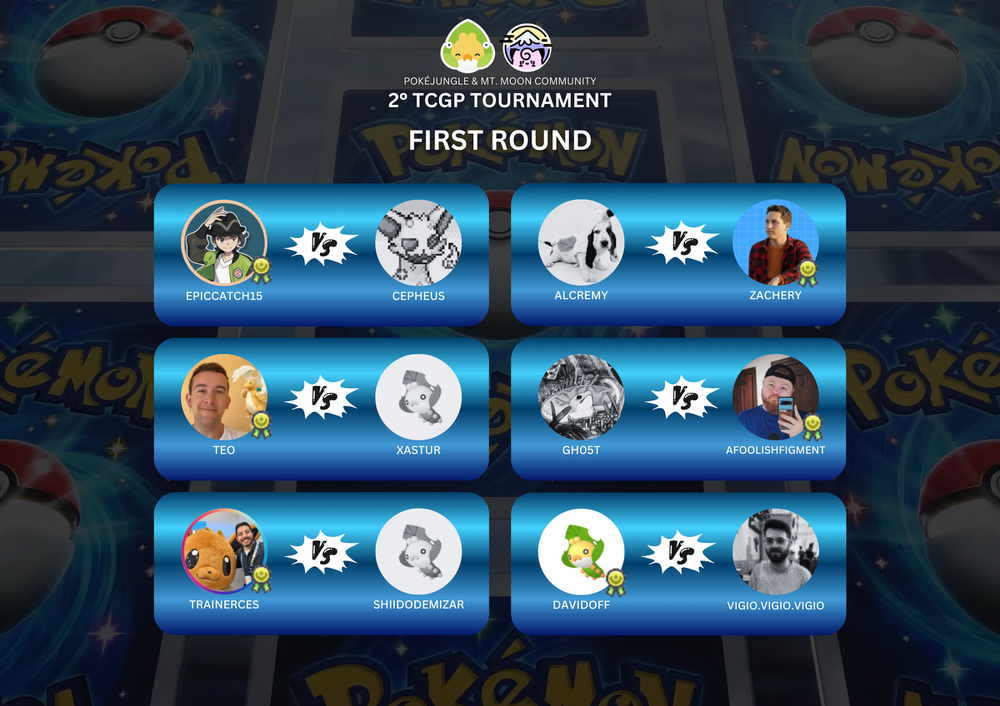
February 4th, 2026
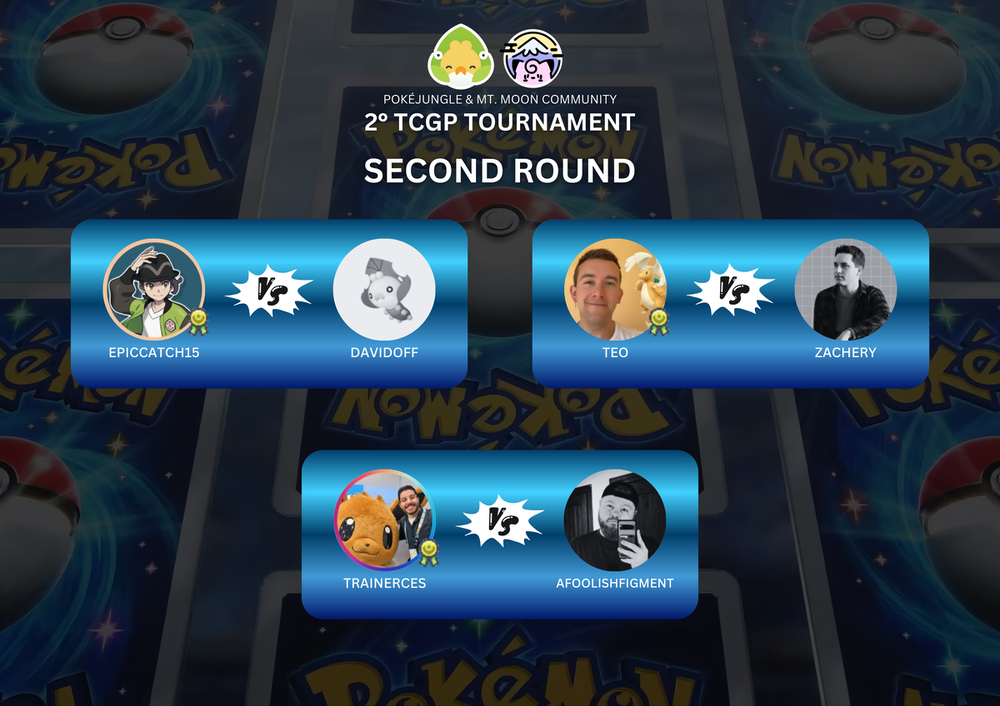
February 8th, 2026
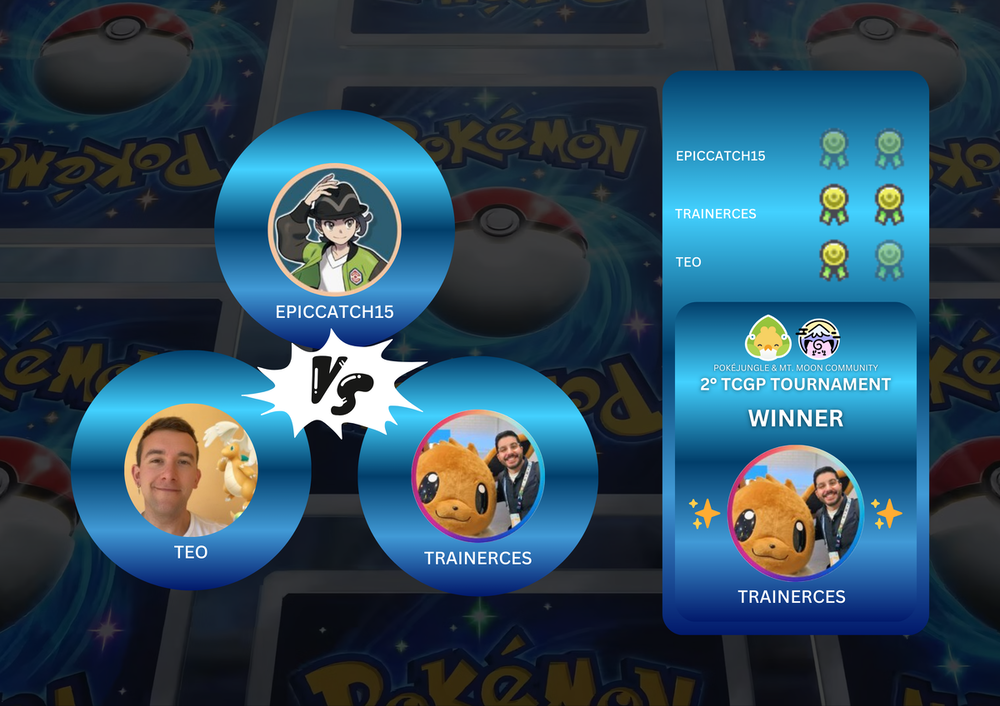
February 12th, 2026
🎉 WINNER OF THE 2° PJ x MMC POKÉMON TCG POCKET TOURNAMENT! 🎉
Dear Trainers,
we are thrilled to announce the champion of our tournament: @TrainerCes! 🏆
A huge round of applause to @EpicCatch15, @Cepheus, @Xastur, @Shiidodemizar, @AlcRemy, @Zachery, @GH05t, @aFoolishFigment, @Davidoff and @vigio.vigio.vigio for participating and making this tournament lively and engaging!
TrainerCes, the trophy is yours! May this victory be just the beginning of many more in our Mt. Moon community. We can’t wait to see you back to defend your title! 😎
Stay tuned on the forum: We’ll be announcing new events and tournaments soon! 📣
-
 2
2